Deploy a full-stack Python app with Postgres, Redis, and workers in 5 minutes
Deploy a full-stack Python app with Postgres, Redis, and workers in 5 minutes
By Platform Super Admin • • Python · DevOps · Databases
Published: May 15, 2026
Category: Python · DevOps · Databases
Reading time: 8 minutes
Author: NEXUS AI Team
Most Python apps are not just one web process.
Even a small production app usually needs:
- A web API, often FastAPI, Flask, or Django.
- PostgreSQL for durable application data.
- Redis for queues, caching, rate limits, or sessions.
- A background worker for slow jobs like emails, scraping, AI calls, imports, PDF generation, or webhook processing.
The painful part is usually not the code. It is wiring the app container, database, cache, worker process, service networking, ports, health checks, environment variables, volumes, logs, and scaling rules.
With the NEXUS AI CLI, you can deploy the whole stack from a Git repository with one command.
This post walks through a practical Python deployment using:
- Python web app
- PostgreSQL service
- Redis service
- RQ background worker
- Internal service networking
- Scaling
- Logs
- Backup
What we are deploying
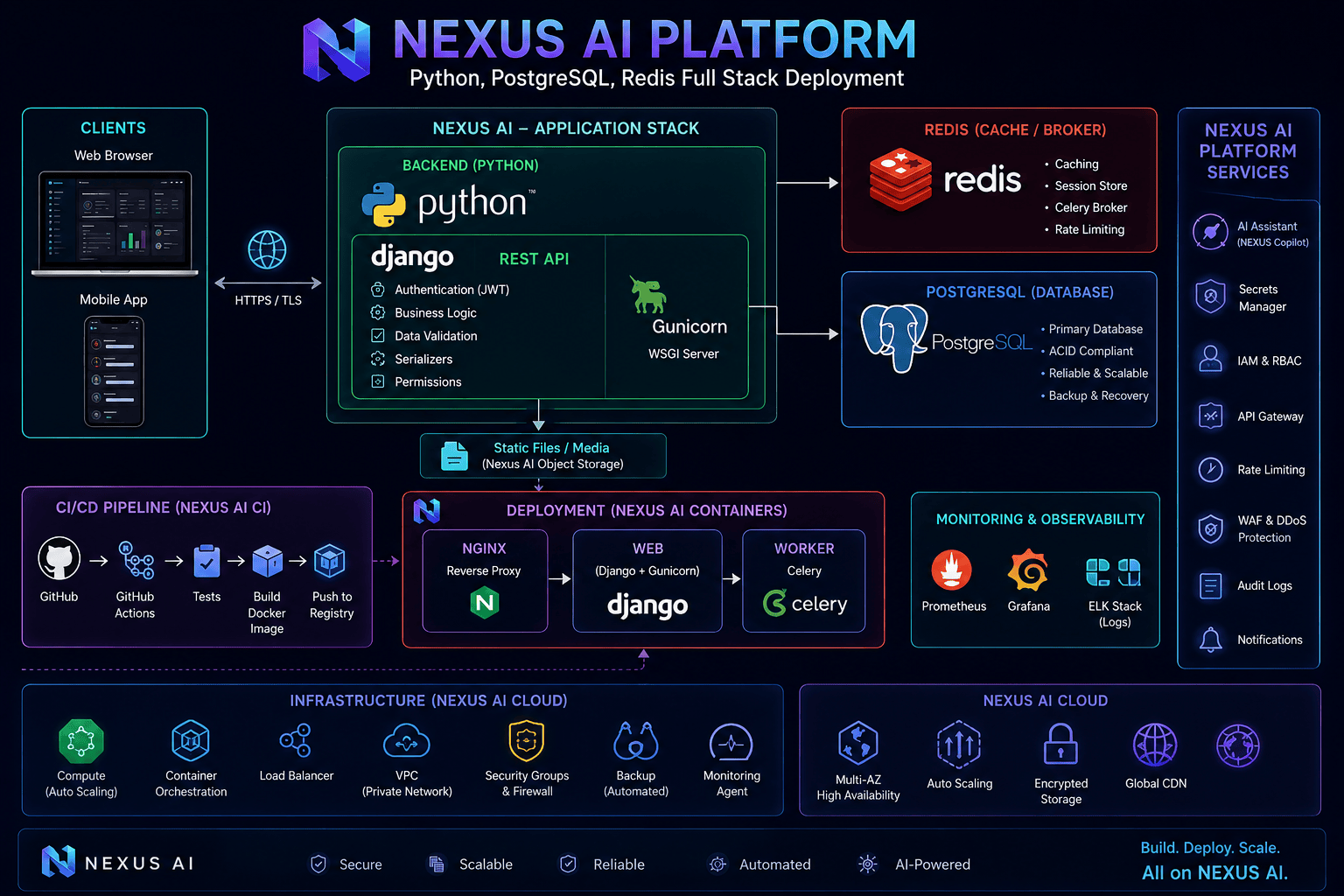
The target architecture looks like this:
Internet
  |
  v
NEXUS AI
  |
  v
Python web container
  |-- connects to postgresql:5432
  |-- connects to redis:6379
  |
  v
Worker container
  |-- runs rq worker default
  |-- connects to the same Postgres and Redis services

PostgreSQL container
Redis container
The important detail: the app and worker do not connect to localhost.
Inside the deployment network, the database hostnames are:
postgresql:5432
redis:6379
NEXUS AI injects the environment variables your app needs, including DATABASE_URL and REDIS_URL.
Prerequisites
You need:
- A NEXUS AI account.
- The NEXUS CLI installed.
- A Git repository containing your Python app.
- A Python app that listens on a known port, usually
8000.
Install the CLI:
curl -fsSL https://nexusai.run/install.sh | bash
On macOS:
curl -fsSL https://nexusai.run/install-mac.sh | bash
Authenticate:
nexus auth login
nexus auth status
Example Python app structure
Your repository can be simple:
my-python-app/
  app.py
  worker.py
  requirements.txt
Example requirements.txt:
fastapi
uvicorn[standard]
psycopg[binary]
redis
rq
Example app.py:
import os
from fastapi import FastAPI
from redis import Redis
from rq import Queue

app = FastAPI()

redis_conn = Redis.from_url(os.environ["REDIS_URL"])
queue = Queue("default", connection=redis_conn)


def run_task(name: str):
    return f"processed {name}"


@app.get("/healthz")
def healthz():
    return {"ok": True}


@app.post("/jobs/{name}")
def enqueue_job(name: str):
    job = queue.enqueue(run_task, name)
    return {"job_id": job.id, "status": "queued"}
Example worker.py:
import os
from redis import Redis
from rq import Worker, Queue

redis_conn = Redis.from_url(os.environ["REDIS_URL"])
worker = Worker([Queue("default", connection=redis_conn)], connection=redis_conn)

worker.work()
For a real app, your task functions usually live in a separate module so both the web process and worker can import them cleanly.
Deploy the full stack
Run one command:
nexus deploy source \
  --repo https://github.com/your-org/my-python-app.git \
  --name my-python-app \
  --provider docker \
  --framework python \
  --branch main \
  --services postgresql,redis \
  --start-command "uvicorn app:app --host 0.0.0.0 --port 8000" \
  --worker-command "python worker.py" \
  --worker-name jobs-worker \
  --wait
That command does the operational work:
- Pulls your Git repository.
- Detects/builds the Python app image.
- Creates the web app container.
- Creates a PostgreSQL service.
- Creates a Redis service.
- Creates a worker container from the same app image.
- Attaches the app, worker, Postgres, and Redis to the same service network.
- Injects database and Redis environment variables.
- Exposes only the web app publicly.
- Keeps the worker private.
The worker does not need a public port. It runs inside the same deployment network and talks to Redis/Postgres by internal hostname.
Environment variables your app receives
For PostgreSQL:
POSTGRES_HOST=postgresql
POSTGRES_PORT=5432
POSTGRES_DB=appdb
POSTGRES_USER=appuser
POSTGRES_PASSWORD=<generated>
DATABASE_URL=postgresql://appuser:<generated>@postgresql:5432/appdb
For Redis:
REDIS_HOST=redis
REDIS_PORT=6379
REDIS_URL=redis://redis:6379/0
Use these values inside the app and worker.
Do not hardcode:
localhost
127.0.0.1
host.docker.internal
Those point to the wrong place from inside a container. Use postgresql and redis.
Check deployment status
nexus deploy status my-python-app
You should see the deployment move through states such as:
PENDING
BUILDING
RUNNING
When it is running, open the deployment URL and check the health route:
curl https://your-app-url/healthz
Expected response:
{"ok":true}
Watch app and worker logs
Tail logs:
nexus deploy logs my-python-app --follow
If your worker is connected correctly, you should see it listening on the queue:
Listening on default...
If the worker cannot resolve Redis, you will see errors like:
Error -2 connecting to redis:6379. Name or service not known.
That usually means the worker was not attached to the deployment network or the app is using the wrong Redis hostname.
Use REDIS_URL=redis://redis:6379/0, not localhost.
Test the queue
Send a job to the web app:
curl -X POST https://your-app-url/jobs/demo
Expected response:
{
  "job_id": "...",
  "status": "queued"
}
Then check logs:
nexus deploy logs my-python-app --follow
You should see the worker pick up the job.
Scale the web app
Scale the web containers to two replicas:
nexus deploy scale my-python-app 2
Scale to three:
nexus deploy scale my-python-app 3
Scale back down:
nexus deploy scale my-python-app 1
Scaling changes the web app replicas. PostgreSQL and Redis are not duplicated. They remain the shared backing services for the deployment.
This matters because a scaled Python app should be stateless at the web layer:
- Store durable data in Postgres.
- Store queue/cache/session data in Redis.
- Store uploaded files in a bucket or attached volume.
- Do not rely on local container files unless you intentionally attached persistent storage.
Add production environment variables
Pass runtime variables directly:
nexus deploy source \
  --repo https://github.com/your-org/my-python-app.git \
  --name my-python-app \
  --provider docker \
  --framework python \
  --services postgresql,redis \
  --env APP_ENV=production \
  --env QUEUE_NAME=default \
  --worker-command "python worker.py" \
  --wait
Or load them from a file:
nexus deploy source \
  --repo https://github.com/your-org/my-python-app.git \
  --name my-python-app \
  --provider docker \
  --framework python \
  --services postgresql,redis \
  --env-file .env.production \
  --worker-command "python worker.py" \
  --wait
For sensitive values, use the secrets vault instead of committing .env files.
nexus secret create OPENAI_API_KEY
Then reference secrets during deployment or from the dashboard, depending on your workflow.
Back up Postgres
List database services:
nexus db services my-python-app
Create a backup:
nexus db backup <postgres-service-id>
List backups:
nexus db backups <postgres-service-id>
Download a backup:
nexus db backup-download <postgres-service-id> <backup-id> --out ./postgres.dump
Restore into the same service:
nexus db restore <postgres-service-id> <backup-id> --yes
Restore into another deployment's Postgres service in the same organization:
nexus db restore-to <target-postgres-service-id> <backup-id> --yes
Before restoring production data, pause write-heavy workers or scale them down if your workflow supports it. A restore can replace database state.
Common fixes
The app cannot connect to Postgres
Check that the app is using:
DATABASE_URL=postgresql://appuser:<password>@postgresql:5432/appdb
The hostname must be postgresql.
The worker cannot connect to Redis
Check that the worker is using:
REDIS_URL=redis://redis:6379/0
The hostname must be redis.
The worker starts, then exits
Make sure the worker command is a long-running process:
--worker-command "python worker.py"
or:
--worker-command "rq worker default"
Do not use a one-shot command unless you intentionally want a short task.
The app deploys, but health checks fail
Confirm the app listens on 0.0.0.0, not 127.0.0.1:
uvicorn app:app --host 0.0.0.0 --port 8000
Also make sure the app exposes a health endpoint such as:
/healthz
Scaling up works, but file uploads disappear
Local container files are ephemeral. Use a NEXUS AI bucket for user uploads or a persistent volume for filesystem-backed data.
For object storage:
nexus bucket create user-uploads --display-name "User uploads"
nexus bucket attach <bucket-id> <deployment-id>
nexus deploy redeploy <deployment-id> --wait
The 5-minute path
If your app already has a working Python web process and worker command, the full deployment is one command:
nexus deploy source \
  --repo https://github.com/your-org/my-python-app.git \
  --name my-python-app \
  --provider docker \
  --framework python \
  --services postgresql,redis \
  --start-command "uvicorn app:app --host 0.0.0.0 --port 8000" \
  --worker-command "python worker.py" \
  --worker-name jobs-worker \
  --wait
Then verify:
nexus deploy status my-python-app
nexus deploy logs my-python-app --follow
curl https://your-app-url/healthz
That is the core workflow: deploy the web app, provision Postgres and Redis, attach the worker to the same network, and manage the whole stack from the CLI.
FAQ
Can I use Celery instead of RQ?
Yes. Use a Celery worker command:
--worker-command "celery -A app.celery worker --loglevel=info"
Does the worker get the same environment variables as the app?
Yes. The worker uses the same built image and receives the same deployment environment variables, including database and Redis connection values.
Does scaling duplicate Postgres or Redis?
No. Scaling changes app replicas. Database and cache services remain shared deployment resources.
Should the worker expose a port?
No. Workers should stay private. They consume jobs from Redis and do not need public ingress.
Can I deploy Django with this pattern?
Yes. Use a Django web command such as gunicorn config.wsgi:application --bind 0.0.0.0:8000 and a worker command such as celery -A config worker --loglevel=info.
Can I use this with private GitHub repositories?
Yes. Store your repository token as a secret and deploy with --repo-secret.
nexus deploy source \
  --repo https://github.com/your-org/private-python-app.git \
  --repo-secret GITHUB_TOKEN \
  --name private-python-app \
  --provider docker \
  --framework python \
  --services postgresql,redis \
  --worker-command "python worker.py" \
  --wait